- Details
- Written by: Stanko Milosev
- Category: Android
- Hits: 1500
interface IWebApiService {
    @Headers("Content-Type: text/json")
    @POST("UploadImage")
    fun uploadImage(@Body image: JsonObject): Call<UploadResponse>
}

data class UploadResponse(
    @SerializedName("message")
    val message: String
)
Upload image:
import android.content.Context
import android.graphics.Bitmap
import android.graphics.BitmapFactory
import android.net.Uri
import android.os.Build
import androidx.annotation.RequiresApi
import com.google.gson.JsonObject
import retrofit2.Call
import retrofit2.Callback
import retrofit2.Response
import java.io.ByteArrayOutputStream
import java.util.Base64

class UploadImageRetrofit(private val uploadImageRetrofitCallBacks: IUploadImageRetrofitCallBacks, private val webApiService: IWebApiService) {
    @RequiresApi(Build.VERSION_CODES.O)
    fun uploadImage(imgUri: Uri, context: Context): String? {

        val base64Image = convertImageToBase64(context, imgUri)
        val jsonValue = JsonObject().apply {
            addProperty("image", base64Image)
            addProperty("fileName", "magnolia.jpg")
            addProperty("folderName", "spring")
        }
        val webApiRequest = webApiService.uploadImage(jsonValue)

        webApiRequest.enqueue(object : Callback<UploadResponse> {
            override fun onResponse(call: Call<UploadResponse>, response: Response<UploadResponse>) {
                uploadImageRetrofitCallBacks.onResponse(call, response)
            }

            override fun onFailure(call: Call<UploadResponse>, t: Throwable) {
                uploadImageRetrofitCallBacks.onFailure(call, t)
            }
        })

        return null
    }

    @RequiresApi(Build.VERSION_CODES.O)
    fun convertImageToBase64(context: Context, imgUri: Uri): String {
        val inputStream = context.contentResolver.openInputStream(imgUri)
        val bitmap: Bitmap = BitmapFactory.decodeStream(inputStream)
        val baos = ByteArrayOutputStream()
        bitmap.compress(Bitmap.CompressFormat.JPEG, 100, baos)
        val imageBytes: ByteArray = baos.toByteArray()
        return Base64.getEncoder().encodeToString(imageBytes)
    }
}
Rest is same as in previous example.
Download from here.
---
UPDATE 2024-04-06: The convertImageToBase64 method in the above example will delete EXIF data, in order not to loose EXIF data use something like this:
@RequiresApi(Build.VERSION_CODES.O)
fun convertImageToBase64(context: Context, imgUri: Uri): String {
	val inputStream = context.contentResolver.openInputStream(imgUri)
	val imageBytes = inputStream.use { input ->
		input?.readBytes()
	} ?: return "" // Handle null input stream or read failure

	return Base64.getEncoder().encodeToString(imageBytes)
}
- Details
- Written by: Stanko Milosev
- Category: Android
- Hits: 1486
<uses-permission android:name="android.permission.INTERNET" />
<uses-permission android:name="android.permission.ACCESS_NETWORK_STATE" />
Api service:
import com.google.gson.annotations.SerializedName
import okhttp3.MultipartBody
import retrofit2.Call
import retrofit2.http.Multipart
import retrofit2.http.POST
import retrofit2.http.Part

interface IWebApiService {
    @Multipart
    @POST("api/UploadPictures/UploadImage")
    fun uploadImage(
        @Part image: MultipartBody.Part?
    ): Call<UploadResponse>
}

data class UploadResponse(
    @SerializedName("message")
    val message: String
)
This time I will create Retrofit using dependency injection:
import android.util.Log
import okhttp3.OkHttpClient
import retrofit2.Retrofit
import retrofit2.converter.gson.GsonConverterFactory
import java.security.cert.X509Certificate
import javax.net.ssl.SSLContext
import javax.net.ssl.TrustManager
import javax.net.ssl.X509TrustManager

internal class CreateRetrofitBuilder : ICreateRetrofitBuilder {
    override fun createRetrofitBuilder(baseUrl: String): Retrofit {
        return Retrofit.Builder()
            .baseUrl(baseUrl)
            .client(trustAllCertificates())
            .addConverterFactory(GsonConverterFactory.create())
            .build()
    }

    private fun trustAllCertificates(): OkHttpClient {
        val trustAllCerts = arrayOf<TrustManager>(object : X509TrustManager {
            override fun checkClientTrusted(chain: Array<out X509Certificate>?, authType: String?) {
                Log.i(MainActivity::class.simpleName, "checkClientTrusted")
            }

            override fun checkServerTrusted(chain: Array<out X509Certificate>?, authType: String?) {
                Log.i(MainActivity::class.simpleName, "checkServerTrusted")
            }

            override fun getAcceptedIssuers() = arrayOf<X509Certificate>()
        })
        val sslContext = SSLContext.getInstance("SSL")
        sslContext.init(null, trustAllCerts, java.security.SecureRandom())

// Create an ssl socket factory with our all-trusting manager
        val sslSocketFactory = sslContext.socketFactory

// connect to server
        return OkHttpClient.Builder()
            .sslSocketFactory(sslSocketFactory, trustAllCerts[0] as X509TrustManager)
            .hostnameVerifier { _, _ -> true }.build()
    }
}
Here notice that I am using "GsonConverterFactory" which means that Retrofit expects JSON anwer from the server, which is why I need UploadResponse class, and from server I will respond with:
return Ok(new { message = "Image uploaded successfully." });
Otherwise I would receive error like:
com.google.gson.stream.MalformedJsonException: Use JsonReader.setLenient(true) to accept malformed JSON at line 1 column 1 path $Where ICreateRetrofitBuilder looks like:
import retrofit2.Retrofit

interface ICreateRetrofitBuilder {
    fun createRetrofitBuilder(baseUrl: String): Retrofit
}
onResponse and onFailure I will also inject and use the like call backs:
import android.app.AlertDialog
import retrofit2.Call
import retrofit2.Response

class UploadImageRetrofitCallBacks(private val alertDialogBuilder: AlertDialog.Builder) :
    IUploadImageRetrofitCallBacks {

    override fun onResponse(call: Call<UploadResponse>, response: Response<UploadResponse>) {
        if (!response.isSuccessful) {
            alertDialogBuilder.setMessage(response.errorBody()!!.charStream().readText())
                .setCancelable(false)
                .setNeutralButton("OK") { dialog, _ ->
                    dialog.dismiss()
                }

            val alert = alertDialogBuilder.create()
            alert.setTitle("Error")
            alert.show()
        } else {
            alertDialogBuilder.setMessage("Response: ${response.body()?.message.toString()}")
                .setCancelable(false)
                .setNeutralButton("OK") { dialog, _ ->
                    dialog.dismiss()
                }

            val alert = alertDialogBuilder.create()
            alert.setTitle("Success")
            alert.show()
        }
    }

    override fun onFailure(call: Call<UploadResponse>, t: Throwable) {
        alertDialogBuilder.setMessage(t.message)
            .setCancelable(false)
            .setNeutralButton("OK") { dialog, _ ->
                dialog.dismiss()
            }

        val alert = alertDialogBuilder.create()
        alert.setTitle("Error")
        alert.show()
    }
}
Where interface looks like:
import retrofit2.Call
import retrofit2.Response

interface IUploadImageRetrofitCallBacks {
    fun onResponse(call: Call<UploadResponse>, response: Response<UploadResponse>)
    fun onFailure(call: Call<UploadResponse>, t: Throwable)
}
Upload image:
import android.content.Context
import android.net.Uri
import okhttp3.MediaType.Companion.toMediaTypeOrNull
import okhttp3.MultipartBody
import okhttp3.RequestBody.Companion.toRequestBody
import retrofit2.Call
import retrofit2.Callback
import retrofit2.Response

class UploadImageRetrofit(private val uploadImageRetrofitCallBacks: IUploadImageRetrofitCallBacks, private val webApiService: IWebApiService) {
    fun uploadImage(imgUri: Uri, context: Context): String? {

        val inputStream = context.contentResolver.openInputStream(imgUri)
        val mediaType = context.contentResolver.getType(imgUri)?.toMediaTypeOrNull()
        val requestFile = inputStream?.use {
            it.readBytes().toRequestBody(mediaType)
        }
        val imagePart: MultipartBody.Part? = requestFile?.let {
            MultipartBody.Part.createFormData("image", "image.jpg", it)
        }

        val webApiRequest = webApiService.uploadImage(imagePart)

        webApiRequest.enqueue(object : Callback<UploadResponse> {
            override fun onResponse(call: Call<UploadResponse>, response: Response<UploadResponse>) {
                uploadImageRetrofitCallBacks.onResponse(call, response)
            }

            override fun onFailure(call: Call<UploadResponse>, t: Throwable) {
                uploadImageRetrofitCallBacks.onFailure(call, t)
            }
        })

        return null
    }
}
At the end, MainActivity looks like this:
import android.app.AlertDialog
import android.os.Bundle
import android.view.View
import androidx.activity.result.contract.ActivityResultContracts
import androidx.appcompat.app.AppCompatActivity

class MainActivity : AppCompatActivity() {
    private lateinit var uploadImage: UploadImageRetrofit

    override fun onCreate(savedInstanceState: Bundle?) {
        super.onCreate(savedInstanceState)
        setContentView(R.layout.activity_main)

        uploadImage = UploadImageRetrofit(
            UploadImageRetrofitCallBacks(AlertDialog.Builder(this@MainActivity)),
            CreateRetrofitBuilder().createRetrofitBuilder("https://10.0.2.2:7181/")
                .create(IWebApiService::class.java)
        )
    }

    private val galleryLauncher =
        this.registerForActivityResult(ActivityResultContracts.GetMultipleContents()) { images ->
            images.forEach { imgUri ->
                uploadImage.uploadImage(imgUri, this)
            }
        }

    fun onOpenGalleryAndUploadButtonClick(view: View) {
        galleryLauncher.launch("image/*")
    }
}
Download from here.
- Details
- Written by: Stanko Milosev
- Category: Android
- Hits: 2108
In order to work in all versions in AndroidManifest.xml I have added:
<uses-permission android:name="android.permission.READ_EXTERNAL_STORAGE" />
<uses-permission android:name="android.permission.WRITE_EXTERNAL_STORAGE" android:maxSdkVersion="28" />
<uses-permission android:name="android.permission.MANAGE_EXTERNAL_STORAGE" />
Please notice if you use MANAGE_EXTERNAL_STORAGE most probably you app will be rejected on play store To check storage permission for all versions of Android I have used following code:
@RequiresApi(Build.VERSION_CODES.R)
fun checkLocalStoragePermission() {
	if (Build.VERSION.SDK_INT >= Build.VERSION_CODES.R) {
		if (!Environment.isExternalStorageManager()) {
			val uri = Uri.parse("package:${BuildConfig.APPLICATION_ID}")
			startActivity(
				Intent(
					Settings.ACTION_MANAGE_APP_ALL_FILES_ACCESS_PERMISSION,
					uri
				)
			)
		}
	}
}
In app\build.gradle.kts I have added buildConfig = true,
buildFeatures {
	buildConfig = true
}
so that piece of code
val uri = Uri.parse("package:${BuildConfig.APPLICATION_ID}")
works
Also, for retrofit I will need permission:
<uses-permission android:name="android.permission.INTERNET" />
<uses-permission android:name="android.permission.ACCESS_NETWORK_STATE" />
In app\build.gradle.kts I have added retrofit:
implementation( "com.squareup.retrofit2:retrofit:2.9.0")
implementation("com.squareup.okhttp3:okhttp:4.12.0")
implementation("com.squareup.retrofit2:converter-scalars:2.9.0")
implementation("com.squareup.retrofit2:converter-gson:2.9.0")
Then I have added WebApiService interface:
import okhttp3.MultipartBody
import retrofit2.Call
import retrofit2.http.Multipart
import retrofit2.http.POST
import retrofit2.http.Part

interface WebApiService {
    @Multipart
    @POST("api/UploadPictures/UploadImage")
    fun uploadImage(
        @Part image: MultipartBody.Part?
    ): Call<UploadResponse>
}

data class UploadResponse(
    @SerializedName("message")
    val message: String
)
Retrofit is almost the same as I already explained here, except the post method:
val imageFile = File(imagePath)
val requestBody = imageFile.asRequestBody("image/*".toMediaTypeOrNull())
val imagePart = MultipartBody.Part.createFormData("image", imageFile.name, requestBody)

val apiService = retrofit.create(WebApiService::class.java)
val webApiRequest = apiService.uploadImage(imagePart)
Here how the whole file looks like:
import android.app.AlertDialog
import android.util.Log
import okhttp3.MediaType.Companion.toMediaTypeOrNull
import okhttp3.MultipartBody
import okhttp3.OkHttpClient
import okhttp3.RequestBody.Companion.asRequestBody
import retrofit2.Call
import retrofit2.Callback
import retrofit2.Response
import retrofit2.Retrofit
import retrofit2.converter.gson.GsonConverterFactory
import java.io.File
import java.security.cert.X509Certificate
import javax.net.ssl.SSLContext
import javax.net.ssl.TrustManager
import javax.net.ssl.X509TrustManager

class UploadImageRetrofit {
    fun uploadImage(imagePath: String, alertDialogBuilder: AlertDialog.Builder): String? {

        val trustAllCerts = arrayOf<TrustManager>(object : X509TrustManager {
            override fun checkClientTrusted(chain: Array<out X509Certificate>?, authType: String?) {
                Log.i(MainActivity::class.simpleName, "checkClientTrusted")
            }

            override fun checkServerTrusted(chain: Array<out X509Certificate>?, authType: String?) {
                Log.i(MainActivity::class.simpleName, "checkServerTrusted")
            }

            override fun getAcceptedIssuers() = arrayOf<X509Certificate>()
        })
        val sslContext = SSLContext.getInstance("SSL")
        sslContext.init(null, trustAllCerts, java.security.SecureRandom())

// Create an ssl socket factory with our all-trusting manager
        val sslSocketFactory = sslContext.socketFactory

// connect to server
        val client = OkHttpClient.Builder()
            .sslSocketFactory(sslSocketFactory, trustAllCerts[0] as X509TrustManager)
            .hostnameVerifier { _, _ -> true }.build()


        val retrofit = Retrofit.Builder()
            .baseUrl("https://10.0.2.2:7181/")
            .client(client)
            .addConverterFactory(GsonConverterFactory.create())
            .build()

        val imageFile = File(imagePath)
        val requestBody = imageFile.asRequestBody("image/*".toMediaTypeOrNull())
        val imagePart = MultipartBody.Part.createFormData("image", imageFile.name, requestBody)

        val apiService = retrofit.create(WebApiService::class.java)
        val webApiRequest = apiService.uploadImage(imagePart)

        webApiRequest.enqueue(object : Callback<UploadResponse> {
            override fun onResponse(call: Call<UploadResponse>, response: Response<UploadResponse>) {

                if (!response.isSuccessful) {
                    alertDialogBuilder.setMessage(response.errorBody()!!.charStream().readText())
                        .setCancelable(false)
                        .setNeutralButton("OK") { dialog, _ ->
                            dialog.dismiss()
                        }

                    val alert = alertDialogBuilder.create()
                    alert.setTitle("Error")
                    alert.show()
                } else {
                    alertDialogBuilder.setMessage("Response: ${response.body()?.message.toString()}")
                        .setCancelable(false)
                        .setNeutralButton("OK") { dialog, _ ->
                            dialog.dismiss()
                        }

                    val alert = alertDialogBuilder.create()
                    alert.setTitle("Success")
                    alert.show()
                }
            }

            override fun onFailure(call: Call<UploadResponse>, t: Throwable) {
                alertDialogBuilder.setMessage(t.message)
                    .setCancelable(false)
                    .setNeutralButton("OK") { dialog, _ ->
                        dialog.dismiss()
                    }

                val alert = alertDialogBuilder.create()
                alert.setTitle("Error")
                alert.show()
            }

        })

        return null
    }
}
MainActivity.kt:
import android.app.AlertDialog
import android.content.Intent
import android.net.Uri
import android.os.Build
import androidx.appcompat.app.AppCompatActivity
import android.os.Bundle
import android.os.Environment
import android.provider.Settings
import android.view.View
import androidx.annotation.RequiresApi

class MainActivity : AppCompatActivity() {
    @RequiresApi(Build.VERSION_CODES.R)
    override fun onCreate(savedInstanceState: Bundle?) {
        super.onCreate(savedInstanceState)
        setContentView(R.layout.activity_main)
        checkLocalStoragePermission()
    }

    fun onUploadImageButtonClick(view: View) {
        val uploadImageRetrofit = UploadImageRetrofit()
        val alertDialogBuilder = AlertDialog.Builder(this@MainActivity)
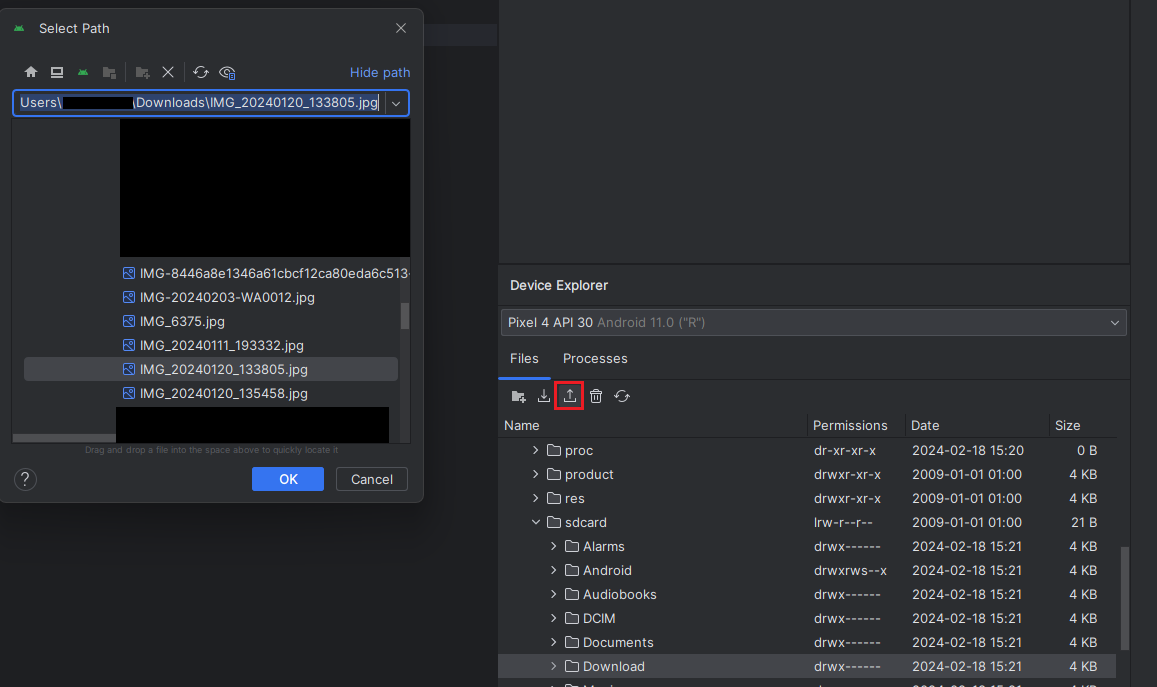
        uploadImageRetrofit.uploadImage("/sdcard/Download/IMG_20240120_133805.jpg", alertDialogBuilder)
    }

    @RequiresApi(Build.VERSION_CODES.R)
    fun checkLocalStoragePermission() {
        if (Build.VERSION.SDK_INT >= Build.VERSION_CODES.R) {
            if (!Environment.isExternalStorageManager()) {
                val uri = Uri.parse("package:${BuildConfig.APPLICATION_ID}")
                startActivity(
                    Intent(
                        Settings.ACTION_MANAGE_APP_ALL_FILES_ACCESS_PERMISSION,
                        uri
                    )
                )
            }
        }
    }
}
Download from here
---
Web API .Net Core controller:
using Microsoft.AspNetCore.Mvc;

namespace UploadPictures.Controllers;

[ApiController]
[Route("api/[controller]")]
public class UploadPicturesController : Controller
{

    private readonly string _uploadPath = Path.Combine(Environment.GetFolderPath(Environment.SpecialFolder.ApplicationData), "UploadPictures", "uploads");

    [HttpPost]
    [Route("UploadImage")]
    public async Task<IActionResult> UploadImage()
    {
        try
        {
            if (!Request.HasFormContentType)
            {
                return BadRequest("Invalid content type. Must be multipart/form-data.");
            }

            var form = await Request.ReadFormAsync();
            var file = form.Files.FirstOrDefault();

            if (file == null)
            {
                return BadRequest("No image file found in the request.");
            }

            // Generate a unique filename
            var filename = Path.GetRandomFileName() + Path.GetExtension(file.FileName);
            var filePath = Path.Combine(_uploadPath, filename);

            // Create the upload directory if it doesn't exist
            Directory.CreateDirectory(_uploadPath);

            // Save the uploaded file
            await using (var stream = new FileStream(filePath, FileMode.Create))
            {
                await file.CopyToAsync(stream);
            }
            return Ok(new { message = "Image uploaded successfully." });
        }
        catch (Exception ex)
        {
            // Log the error for debugging
            Console.WriteLine(ex.ToString());
            return StatusCode(500, "Internal server error.");
        }
    }
}
Download Visual Studio .NET Core example from here
- Details
- Written by: Stanko Milosev
- Category: Android
- Hits: 1500
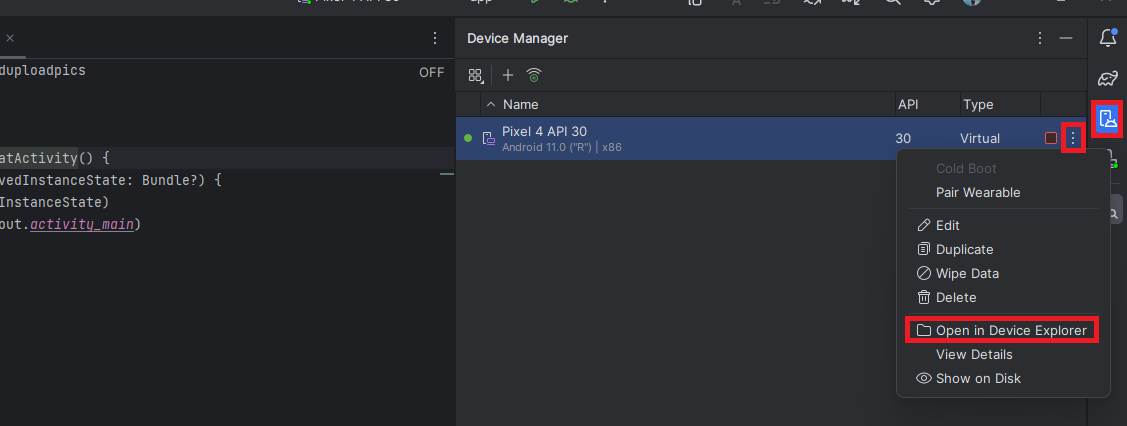 And click on button upload