milosev.com
  • Home
    • List all categories
    • Sitemap
  • Downloads
    • WebSphere
    • Hitachi902
    • Hospital
    • Kryptonite
    • OCR
    • APK
  • About me
    • Gallery
      • Italy2022
      • Côte d'Azur 2024
    • Curriculum vitae
      • Resume
      • Lebenslauf
    • Social networks
      • Facebook
      • Twitter
      • LinkedIn
      • Xing
      • GitHub
      • Google Maps
      • Sports tracker
    • Adventures planning
  1. You are here:  
  2. Home
  3. C#

Pre-build events

Details
Written by: Stanko Milosev
Category: C#
Published: 12 February 2021
Last Updated: 12 February 2021
Hits: 3573
  • visual studio
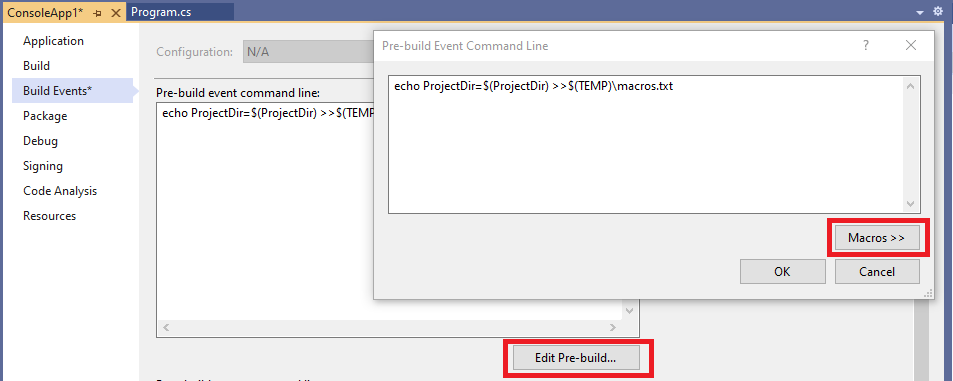
In order to save output of your Pre-build Events write something like:

echo ProjectDir=$(ProjectDir) >>$(TEMP)\macros.txt
Then open file %temp%\macros.txt

List of Macros you can see in Edit Pre-Build -> Macros >>

Split string in four blocks

Details
Written by: Stanko Milosev
Category: C#
Published: 05 October 2020
Last Updated: 05 October 2020
Hits: 3947
  • regular expressions
One example on how to display IBAN in four blocks:
Regex.Replace("DE89370400440532013000", ".{4}", "$0 ");

LINQ to XML duplicated Node

Details
Written by: Stanko Milosev
Category: C#
Published: 12 September 2020
Last Updated: 15 September 2020
Hits: 3722
  • xml
For example you want to extract from XML Key - Value - Pair. First "value" node is key, second "value" node is value. Example XML:
<params>
	<param>
		<value>
			<array>
				<data>
					<value>
						<string>NameOfValueOne</string>
					</value>
					<value>
						<string>ValueOne</string>
					</value>
				</data>
			</array>
		</value>
	</param>
	<param>
		<value>
			<array>
				<data>
					<value>
						<string>NameOfValueTwo</string>
					</value>
					<value>
						<string>ValueTwo</string>
					</value>
				</data>
			</array>
		</value>
	</param>
</params>
Code:
Dictionary<string, string> myDict = new Dictionary<string, string>();
XElement myXML = XElement.Load("xml.xml");
IEnumerable<XElement> xElementData = from data in myXML.Descendants("data") select data;
foreach (XElement xElement in xElementData)
{
	myDict[(string)xElement.Elements().ElementAt(0)] = (string)xElement.Elements().ElementAt(1);
}

foreach (KeyValuePair<string, string> keyValuePair in myDict)
{
	Console.WriteLine($"Key: {keyValuePair.Key}, value: {keyValuePair.Value}");
}

Console.WriteLine("Press any key");
Console.ReadKey();
POI:
IEnumerable<XElement> xElementData = from data in myXML.Descendants("data") select data;
foreach (XElement xElement in xElementData)
{
	myDict[(string)xElement.Elements().ElementAt(0)] = (string)xElement.Elements().ElementAt(1);
}
Source download from here.

Detect the encoding/codepage of a text file

Details
Written by: Stanko Milosev
Category: C#
Published: 11 July 2020
Last Updated: 13 December 2023
Hits: 5433
  • core
2023-12-13 UPDATE: Please notice that there is a bug in the file TextFileEncodingDetector.cs as commented here.

In Method DetectSuspiciousUTF8SequenceLength instead of:

SampleBytes.Length >= currentPos + 1
it should be:
SampleBytes.Length > currentPos + 1
One my example on how to detect the encoding/codepage of a text file using TextFileEncodingDetector project in .NET core.

First to mention that not even Notepad++ can't detect the encoding/codepage of a text file correctly. Try to save one file with, for example, Windows-1252 character set and reopen it again.
In my case I will save few files with different encoding in C#. In order to test if files were correctly saved I have opened them with binary editor in Visual studio 2019:

File -> Open

Open with

Binary editor

Check hexadecimal value of unicode code points for example UTF-16 Table, UTF-8 Table, or for example "ß" - German eszett, here or here.

And here is da code:

using KlerksSoft;
using System;
using System.Collections.Generic;
using System.Diagnostics;
using System.IO;
using System.Text;

namespace EncodingDetector
{
    class Program
    {
        static void Main(string[] args)
        {
            Console.WriteLine("Read all encodings from the system and write file for each encoding.");

            string exampleStringToWrite = "üöäß;ÜÖÄß@€µ";

            List<string> savedFiles = new List<string>();
            ProcessModule processModule = Process.GetCurrentProcess().MainModule;
            string exePath = string.Empty;
            if (processModule != null)
            {
                exePath = Path.GetDirectoryName(processModule.FileName);
            }

            foreach (EncodingInfo encodingInfo in Encoding.GetEncodings())
            {
                string fileName = $"{encodingInfo.DisplayName}.txt";
                foreach (char c in Path.GetInvalidFileNameChars())
                {
                    fileName = fileName.Replace(c, '_');
                }

                fileName = Path.Combine(exePath ?? string.Empty, fileName);

                using (StreamWriter sw = new StreamWriter(File.Open(fileName, FileMode.Create), encodingInfo.GetEncoding()))
                {
                    sw.WriteLine(exampleStringToWrite);
                    savedFiles.Add(fileName);
                    Console.WriteLine($"File {fileName} saved.");
                }
            }

            string windows1252File = Path.Combine(exePath ?? string.Empty, "windows1252.txt");
            Encoding.RegisterProvider(CodePagesEncodingProvider.Instance);
            using (StreamWriter sw = new StreamWriter(File.Open(windows1252File, FileMode.Create), Encoding.GetEncoding(1252)))
            {
                sw.WriteLine(exampleStringToWrite);
                Console.WriteLine($"File {windows1252File} saved.");
            }


            Console.WriteLine("Press any key to detect encodings");
            Console.ReadKey();

            foreach (string savedFile in savedFiles)
            {
                DisplayEncodingInConsole(savedFile);
            }

            DisplayEncodingInConsole(windows1252File);

            Console.WriteLine("Finished");
            Console.ReadKey();
        }

        private static void DisplayEncodingInConsole(string fileName)
        {
            Encoding encoding = TextFileEncodingDetector.DetectTextFileEncoding(fileName);

            if (encoding is null)
            {
                Console.WriteLine($"File {fileName} is most probably encoded as {Encoding.Default}");
            }
            else
            {
                Console.WriteLine($"File {fileName} encoded as {encoding}");
            }
        }
    }
}
Here is the source code.
  1. Read file in chunks
  2. List.Contains
  3. JSON configuration file in .NET core
  4. JSON in .NET

Subcategories

WPF

Beginning

Code snippets

NUnit

LINQ

Windows Forms

Page 12 of 39

  • 7
  • 8
  • 9
  • 10
  • 11
  • 12
  • 13
  • 14
  • 15
  • 16