
- Details
- Written by: Stanko Milosev
- Category: C#
- Hits: 4492
<params>
	<param>
		<value>
			<array>
				<data>
					<value>
						<string>NameOfValueOne</string>
					</value>
					<value>
						<string>ValueOne</string>
					</value>
				</data>
			</array>
		</value>
	</param>
	<param>
		<value>
			<array>
				<data>
					<value>
						<string>NameOfValueTwo</string>
					</value>
					<value>
						<string>ValueTwo</string>
					</value>
				</data>
			</array>
		</value>
	</param>
</params>
Code:
Dictionary<string, string> myDict = new Dictionary<string, string>();
XElement myXML = XElement.Load("xml.xml");
IEnumerable<XElement> xElementData = from data in myXML.Descendants("data") select data;
foreach (XElement xElement in xElementData)
{
	myDict[(string)xElement.Elements().ElementAt(0)] = (string)xElement.Elements().ElementAt(1);
}

foreach (KeyValuePair<string, string> keyValuePair in myDict)
{
	Console.WriteLine($"Key: {keyValuePair.Key}, value: {keyValuePair.Value}");
}

Console.WriteLine("Press any key");
Console.ReadKey();
POI:
IEnumerable<XElement> xElementData = from data in myXML.Descendants("data") select data;
foreach (XElement xElement in xElementData)
{
	myDict[(string)xElement.Elements().ElementAt(0)] = (string)xElement.Elements().ElementAt(1);
}
Source download from here.
- Details
- Written by: Stanko Milosev
- Category: C#
- Hits: 6670
SampleBytes.Length >= currentPos + 1it should be:
SampleBytes.Length > currentPos + 1One my example on how to detect the encoding/codepage of a text file using TextFileEncodingDetector project in .NET core. First to mention that not even Notepad++ can't detect the encoding/codepage of a text file correctly. Try to save one file with, for example, Windows-1252 character set and reopen it again.
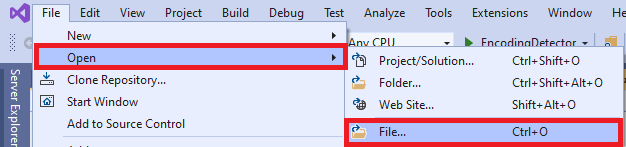
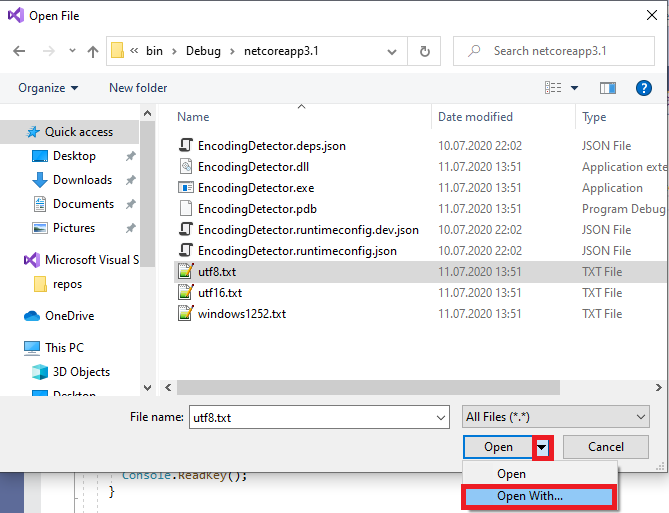
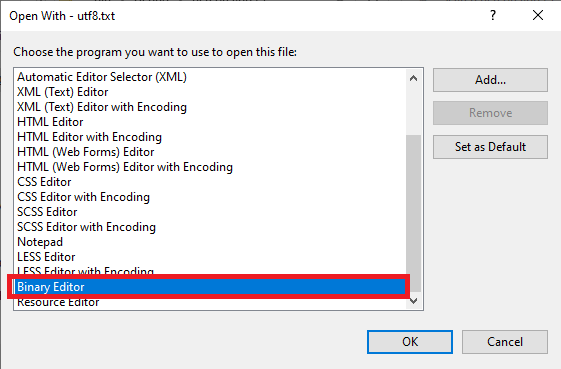
In my case I will save few files with different encoding in C#. In order to test if files were correctly saved I have opened them with binary editor in Visual studio 2019: File -> Open
 Open with
 Binary editor
 Check hexadecimal value of unicode code points for example UTF-16 Table, UTF-8 Table, or for example "ß" - German eszett, here or here.
And here is da code:
Check hexadecimal value of unicode code points for example UTF-16 Table, UTF-8 Table, or for example "ß" - German eszett, here or here.
And here is da code:
using KlerksSoft;
using System;
using System.Collections.Generic;
using System.Diagnostics;
using System.IO;
using System.Text;

namespace EncodingDetector
{
    class Program
    {
        static void Main(string[] args)
        {
            Console.WriteLine("Read all encodings from the system and write file for each encoding.");

            string exampleStringToWrite = "üöäß;ÜÖÄß@€µ";

            List<string> savedFiles = new List<string>();
            ProcessModule processModule = Process.GetCurrentProcess().MainModule;
            string exePath = string.Empty;
            if (processModule != null)
            {
                exePath = Path.GetDirectoryName(processModule.FileName);
            }

            foreach (EncodingInfo encodingInfo in Encoding.GetEncodings())
            {
                string fileName = $"{encodingInfo.DisplayName}.txt";
                foreach (char c in Path.GetInvalidFileNameChars())
                {
                    fileName = fileName.Replace(c, '_');
                }

                fileName = Path.Combine(exePath ?? string.Empty, fileName);

                using (StreamWriter sw = new StreamWriter(File.Open(fileName, FileMode.Create), encodingInfo.GetEncoding()))
                {
                    sw.WriteLine(exampleStringToWrite);
                    savedFiles.Add(fileName);
                    Console.WriteLine($"File {fileName} saved.");
                }
            }

            string windows1252File = Path.Combine(exePath ?? string.Empty, "windows1252.txt");
            Encoding.RegisterProvider(CodePagesEncodingProvider.Instance);
            using (StreamWriter sw = new StreamWriter(File.Open(windows1252File, FileMode.Create), Encoding.GetEncoding(1252)))
            {
                sw.WriteLine(exampleStringToWrite);
                Console.WriteLine($"File {windows1252File} saved.");
            }


            Console.WriteLine("Press any key to detect encodings");
            Console.ReadKey();

            foreach (string savedFile in savedFiles)
            {
                DisplayEncodingInConsole(savedFile);
            }

            DisplayEncodingInConsole(windows1252File);

            Console.WriteLine("Finished");
            Console.ReadKey();
        }

        private static void DisplayEncodingInConsole(string fileName)
        {
            Encoding encoding = TextFileEncodingDetector.DetectTextFileEncoding(fileName);

            if (encoding is null)
            {
                Console.WriteLine($"File {fileName} is most probably encoded as {Encoding.Default}");
            }
            else
            {
                Console.WriteLine($"File {fileName} encoded as {encoding}");
            }
        }
    }
}
Here is the source code.
- Details
- Written by: Stanko Milosev
- Category: C#
- Hits: 5049
using System;
using System.IO;
using System.Text;

namespace ReadFileInChunks
{
    class Program
    {
        static void Main(string[] args)
        {
            int lineNumber = 0;

            long beginBytes = System.Diagnostics.Process.GetCurrentProcess().WorkingSet64;
            Console.WriteLine($"Bytes: {beginBytes}");
            Console.WriteLine("");
            Console.ReadKey();

            long beginMemory = GC.GetTotalMemory(true);
            Console.WriteLine($"Memory: {beginMemory}");
            Console.WriteLine("");
            Console.ReadKey();

            //string wholeFile = File.ReadAllText("test.txt");

            //Console.WriteLine("");
            //Console.WriteLine("******************");
            //Console.WriteLine("*    ReadAllText *");
            //Console.WriteLine("******************");
            //Console.WriteLine("");

            //beginBytes = System.Diagnostics.Process.GetCurrentProcess().WorkingSet64;
            //Console.WriteLine($"Bytes: {beginBytes}");
            //Console.WriteLine("");
            //Console.ReadKey();

            //beginMemory = GC.GetTotalMemory(true);
            //Console.WriteLine($"Memory: {beginMemory}");
            //Console.WriteLine("");
            //Console.ReadKey();

            using (FileStream fileStream = new FileStream("test.txt", FileMode.Open, FileAccess.Read))
            {
                int count = 10000;
                byte[] buffer = new byte[count];

                int read = 1;
                while (read > 0)
                {
                    read = fileStream.Read(buffer, 0, count);
                    string partOfFile = Encoding.UTF8.GetString(buffer, 0, read);
                    using (MemoryStream memoryStream = new MemoryStream(Encoding.UTF8.GetBytes(partOfFile)))
                    {
                        using (StreamReader streamReader = new StreamReader(memoryStream, Encoding.UTF8, true))
                        {
                            while (!streamReader.EndOfStream)
                            {
                                Console.WriteLine($"{lineNumber++}: {streamReader.ReadLine()}");
                            }
                        }
                    }
                    Console.WriteLine("");
                    Console.WriteLine("******************");
                    Console.WriteLine("*    Next block  *");
                    Console.WriteLine("******************");
                    Console.WriteLine("");

                    long bytes = System.Diagnostics.Process.GetCurrentProcess().WorkingSet64;
                    Console.WriteLine($"Bytes at the beginning: {beginBytes}, current bytes: {bytes}");

                    Console.WriteLine("");
                    Console.ReadKey();

                    long memory = GC.GetTotalMemory(true);
                    Console.WriteLine($"Memory at the beginning: {beginMemory}, current memory: {memory}");
                    Console.WriteLine("");
                    Console.ReadKey();
                }
            }
            Console.WriteLine("Press any key");
            Console.ReadKey();
        }
    }
}
- Details
- Written by: Stanko Milosev
- Category: C#
- Hits: 4582
class IDName: IEquatable<IDName>
{
	public Guid ID { get; set; }
	public string Name { get; set; }

	public IDName (Guid id, string name)
	{
		ID = id;
		Name = name;
	}

	public bool Equals(IDName other)
	{
		return ID == other.ID && Name == other.Name;
	}
}
Program:
using System;
using System.Collections.Generic;

namespace Contains
{
	class Program
	{
		static void Main(string[] args)
		{
			List<IDName> idNames = new List<IDName>();

			Guid idFirst = Guid.NewGuid();
			IDName idNameFirst = new IDName(idFirst, "first");

			Guid idSecond = Guid.NewGuid();
			IDName idNameSecond = new IDName(idSecond, "second");

			idNames.Add(idNameFirst);
			idNames.Add(idNameSecond);

			if (idNames.Contains(idNameFirst))
			{
				Console.WriteLine("idNameFirst is already added");
			}

			Console.ReadKey();
		}
	}
}